Help
This page explains how to use the main search modules and analysis tools in PPIKB. Use the contents panel to jump to a specific module. Search-result pages support opening entry details by clicking the result ID, selecting individual records, and downloading the selected or all matched results when available.
Text Search
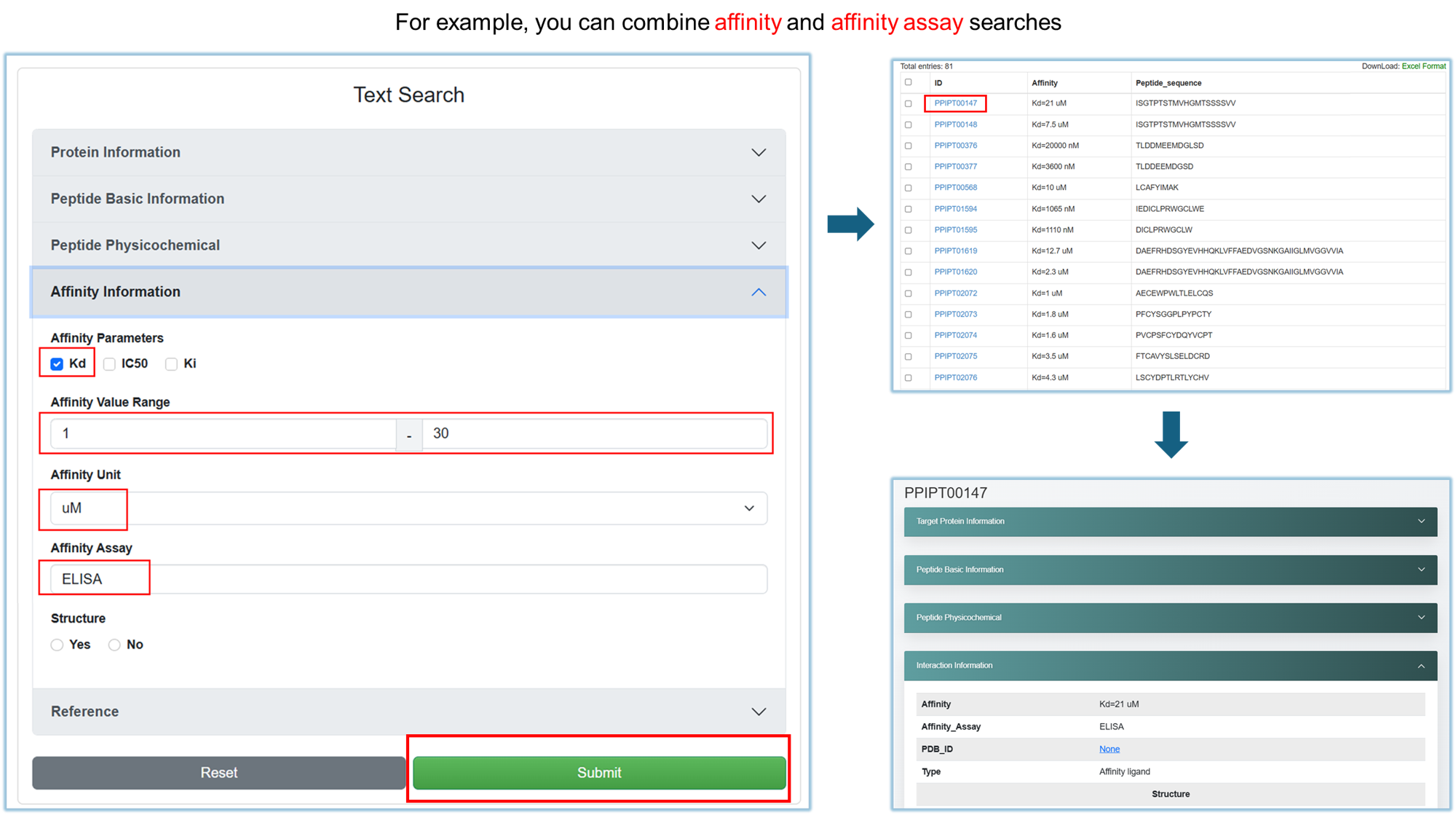
Text Search is used to retrieve peptide–protein interaction records by combining protein, peptide, affinity, physicochemical, and reference fields.
- Open the section that contains the field you want to search, such as protein name, UniProt ID, peptide sequence, peptide length, linear/cyclic status, residue modification, affinity parameter, affinity range, assay, structure availability, or release year.
- Enter text, select options, or set a numeric range. Multiple fields can be used together to narrow the result set.
- For checkbox-style filters such as affinity parameters, select one or more options as needed. For single-choice filters, select the option that matches the required condition.
- Click Submit to run the search, or click Reset to clear all input.
- In the result table, click an ID to open the detailed entry page. The detail page displays the matched field values, such as linear/cyclic type and affinity value.
Structure Search
Structure Search retrieves peptide–protein complex structure records. It is suitable for searching by structural identifiers and structure-related metadata.
- Enter a PDB ID or experimental method when you want to locate a specific structure or structure type.
- Use numeric ranges, such as peptide length, resolution, or release year, to refine the query.
- Select peptide features such as linear/cyclic status or residue modification when needed.
- Click Submit to search. The result table shows structure records and provides links to detailed structure pages and external PDB pages.
Drug Search
Drug Search retrieves peptide drug records and related target information. It can be used to search by drug information, target information, and biological annotation.
- Enter one or more drug-related fields, such as name, peptide sequence, indication, or drug type.
- Enter one or more target-related fields, such as UniProt ID, gene name, entity name, organism, or action.
- Submit the query to view matching drug records. Click a record ID to open its detailed drug and target information page.
- Use the download function on the result page to export selected or all matched records when needed.
Search Results and Entry Pages
After submitting a search, PPIKB displays matched records in a result table. The common operations are the same across Text Search, Structure Search, Drug Search, and classification-based browsing pages.
Open details
Click the ID in the result table to open the full entry page. Entry pages show grouped information, such as protein, peptide, interaction, structure, or drug-target data.
Download results
Select checkboxes and click Excel Format to download selected records. When All Results is available, it exports all matched records across all pages.
Pagination
Use page buttons to browse the result set. Pagination only changes the displayed rows; it does not change the original query conditions.
External links
Some identifiers, such as UniProt IDs or PDB IDs, link to external databases for additional annotation and structure information.
BLAST Search
BLAST Search finds homologous protein or peptide sequences in PPIKB from a query amino-acid sequence. The query should be provided in FASTA format.
- Paste a FASTA sequence into the text area, or upload a FASTA file.
- Open Search Settings when you need to change the scoring matrix. The default matrix is BLOSUM62.
- Use BLOSUM80 for close homologs and BLOSUM45 for more distant homologs when appropriate.
- Click Search. The result page lists significant alignments with subject IDs, scores, and E-values.
- Click a subject ID in the result to open the corresponding PPIKB entry page.
>identifier, followed by the amino-acid sequence. Only standard amino-acid letters should be used.
Foldseek Search
Foldseek Search compares protein structures or sequences against the PPIKB structure database. It supports easy-search and multimer-search workflows.
- Select Easy Search or Multimer Search according to the query type.
- Paste a FASTA amino-acid sequence, or upload a PDB/CIF file for structural search.
- Select the mode. 3Di/AA is used for mixed structural/sequence signal, and TM-align is used for structural alignment of uploaded structures.
- Select the output format. BLAST-TAB provides a table view, while Pretty HTML embeds the Foldseek viewer.
- Click Search and review the output. In BLAST-TAB output, click target IDs to open entry pages.

SMILES Similarity
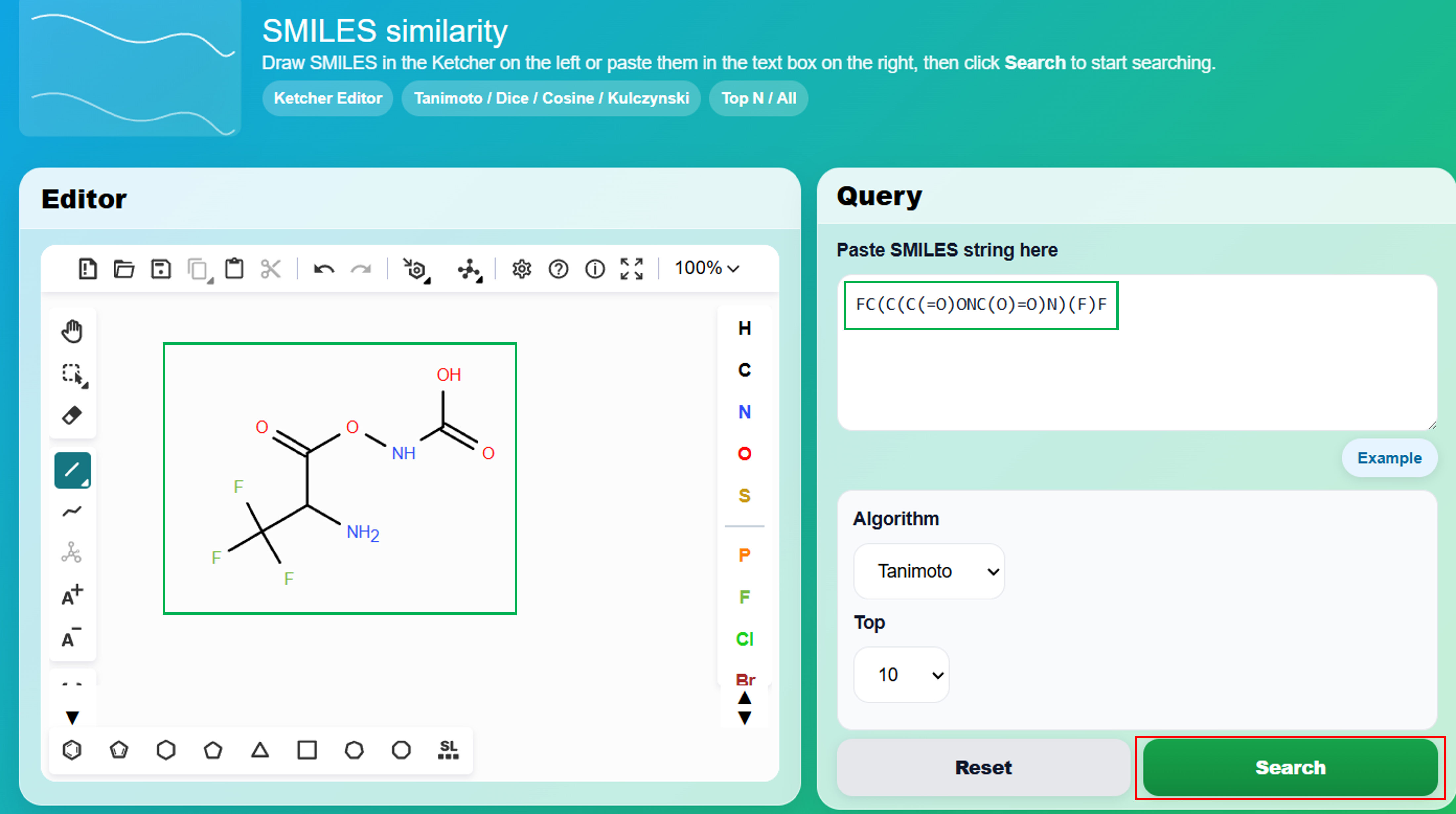
SMILES Similarity searches for similar peptide drug or molecule records using a SMILES query. You can draw the structure in the Ketcher editor or paste the SMILES string directly.
- Draw a molecule in the Ketcher editor, or paste a SMILES string into the query text area.
- Select a similarity algorithm: Tanimoto, Dice, Cosine, or Kulczynski.
- Select the number of returned results, such as top 5, top 10, top 100, or all results.
- Click Search. The output lists the most similar records according to the selected algorithm.
- Use result links to open the corresponding PPIKB entries for detailed information.